
Summoners War: Rush 2.0.34627 MOD Menu APK | One Hit Kill, Attack Multiplier, Defense Multiplier, Move Speed Multiplier

- Updated
- Version 2.0.34627
- Size 1601.16 MB
- Requirements Android 8.0
- Developer Com2uS
- Genre Role Playing
- Google Play



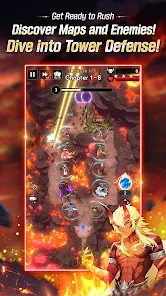



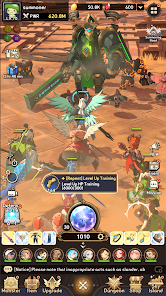



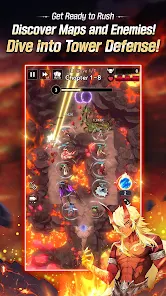


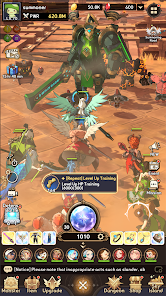



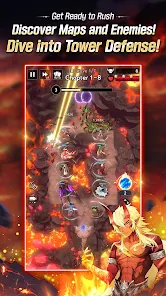


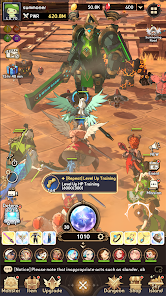

Summoners War: Rush blends idle progression with tower defense strategy, tasking you with deploying diverse monsters across tactical grid battlefields while building teams for idle farming campaigns and competitive arena ranks. The core appeal stems from 24/7 AFK progression, strategic monster placement against randomized boss weaknesses, and discovering optimal team synergies through fusion combinations. However, natural friction emerges quickly: advancing through campaign stages and sky island defense content demands careful resource allocation across Guard Boost upgrades, Monster level progression, and Relic enhancements—a grind requiring strategic prioritization of limited daily dungeon attempts.
In real usage, new players face overwhelming complexity balancing monster summons, equipment farming, and tower defense strategy without clear guidance. From testing, understanding which monsters exploit specific boss weaknesses and determining optimal skill card deployment becomes crucial, especially when resource scarcity forces difficult choices between upgrading attack stats versus accuracy. Users struggle determining whether to focus on completing idle campaign stages for passive income, farming specific relic materials, or investing in Guard Boost level progression for accessing higher-tier support skills.
This resource allows you to bypass grinding bottlenecks and immediately experiment with advanced monster teams, skill card combinations, and tower defense formations without stamina limitations or resource scarcity. The MOD version enables rapid testing of different monster deployments and stat priority allocations before committing to extended farming sessions on the main account. A secondary account is strongly recommended for safe exploration of various strategy approaches. See What’s Mod and Technical Details below.
How to Install (Click the Spoilers to Read):
Signed
Signed APKs are compatible with all Android devices — both rooted and non-rooted. Most mod publishers release only the signed version, as it works universally across all devices.
Installation Guide
- Uninstall the original version of the game or app.
- Download the latest MOD APK file.
- Tap to install the downloaded file.
- Launch the game and enjoy your new features!
Login Information
Please note: Google login is not available when using signed MOD APKs.
- Facebook login (if supported) can work, but you must uninstall the Facebook app from your device first.
- Other login methods — such as email, transfer codes, or guest login — typically work without issues.
Important Notes
- In-app purchases (IAP) are not supported in signed APKs since they rely on Google Play services, similar to the Google login process.
- If you have used a previous version of our MOD, you can update directly by installing the new APK over the old one — no need to uninstall.
Unsigned
Unsigned APKs work only on rooted and patched Android devices. These files are not always released by mod publishers, since they require specific device conditions to function properly.
Requirements
- Your Android device must be rooted.
- Your device must be patched to bypass app signature verification.
- This can be achieved using tools like Lucky Patcher or Xposed Framework.
- Your device must be patched to bypass app signature verification.
Once these requirements are met, installing an unsigned MOD APK is similar to installing a signed one — with one key difference: 👉 You can install it directly over the original app without uninstalling it first.
Installation Guide
- Download the unsigned MOD APK.
- Install it on your device.
- Launch the game or app and enjoy!
Notes
- If the unsigned APK fails to install, your device patch was not applied correctly.
- Login methods and in-app purchases (IAP) in unsigned MODs work just like in the original game.
- Google login functions normally.
- You can keep the Facebook app installed — no need to remove it.
- Login methods and in-app purchases (IAP) in unsigned MODs work just like in the original game.
OBB Files
Not every game or app requires OBB files, but if they do, the mod publisher will usually include them and mention that they are needed.
Step-by-Step Installation Guide
- Download the required OBB file(s).
- Download the corresponding MOD APK.
- Using a file manager, move the OBB files to the following location on your device: 👉
Android/obb/<packagecode>
- Using a file manager, move the OBB files to the following location on your device: 👉
- Install the downloaded MOD APK.
- Open the game and enjoy playing!
Important Notes
- If you receive a ZIP file, make sure to extract it first before placing the contents into the correct folder.
- OBB files are usually provided as either “.obb” files or “.zip” archives.
XAPK, APKS, or ZIP Files
- Download the .xapk, .apks, or .zip file from the website.
- Install the Split APKs Installer (SAI) app from Google Play.
- Open SAI, locate the downloaded file, and start the installation process.
- Once installed, launch the game or app and enjoy!
Don’t risk your device with shady mods full of ads! At enmods.com, we only share safe and trusted mods—no hidden junk, no fake downloads. We care about your experience and want you to enjoy worry-free gaming.

- One Hit Kill
- Attack Multiplier
- Defense Multiplier
- Move Speed Multiplier
 Show/Hide Mod info:
 ![Birdie Crush: Fantasy Golf 2.6.4 [MOD Menu APK][Always Perfect Shot]](https://enmods.com/wp-content/uploads/2025/12/2337-birdie-crush-fantasy-golf.png)

![Evertale 2.0.100 [MOD Menu APK][Damage Multiplier][God Mode][100% Capture Rate][Max Team Cost]](https://enmods.com/wp-content/uploads/2025/12/2523-evertale.png)
![Cat Legends: Idle RPG Games 1.1.32 [MOD Menu APK][Damage Multiplier][God Mode][Gold & Diamonds Always Increase]](https://enmods.com/wp-content/uploads/2025/10/214-cat-legends-idle-rpg-games.png)

![Siege Rumble 1.0.0037 [MOD Menu APK][Damage Multiplier][God Mode][Cheat Type Options]](https://enmods.com/wp-content/uploads/2025/12/2449-siege-rumble.png)
1.9.033 version last pls