Demon Castle Story 1.3.5 MOD Menu APK | Unlock Full, Add 1,000,000 Gold, 10,000 Monster Points, 10,000 Crystals, Unlock High Speed

- Updated
- Version 1.3.5
- Size 51.16 MB
- Requirements Android 6.0
- Developer Kairosoft
- Genre Adventure
- Google Play


About Demon Castle Story
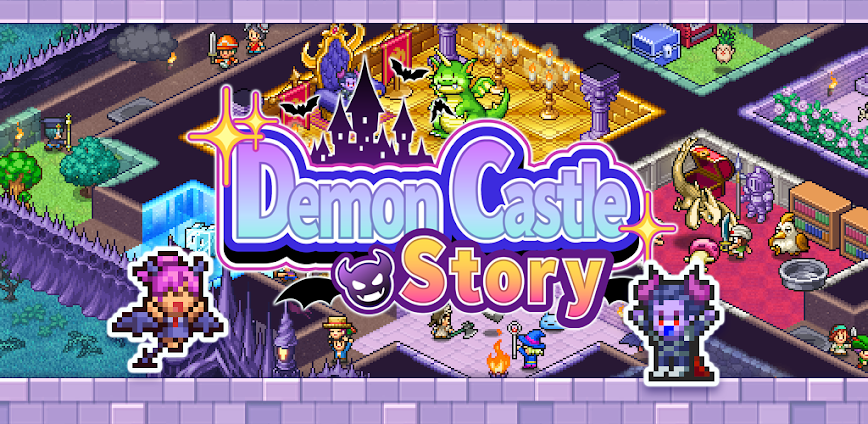
Demon Castle Story is a management simulation RPG developed by Kairosoft where players become the Demon Overlord, transforming a run-down castle into a fearsome stronghold to repel adventurer invasions. The game appeals to tower defense enthusiasts and Kairosoft fans seeking the villain’s perspective in dungeon-crawling scenarios. New players face steep initial difficulty as monsters don’t gain strength quickly enough to match early challenges, requiring strategic use of the castle door closing mechanic.
From hands-on castle management sessions, the Monster Fusion System combines Pokémon-style evolution with Persona-like merging mechanics to create powerful new creatures. The Trap Development feature lets you deploy sleep-inducing gas, heavy washbowls, and crossbow corridors to weaken invaders before your monsters deliver final blows. Adventures send minions to explore dungeons and towns, returning with loot, items, and potential new allies. However, castle space becomes cramped with expanding monster armies, forcing difficult decisions about which units to prioritize.
Users exploring modified versions typically want to evaluate the full monster roster and test different castle layouts without the premium purchase requirement. This allows assessing whether the reverse-role gameplay and replayability features match their simulation preferences. Consider using a secondary device for testing to protect any existing Kairosoft game data.
Should You Use Demon Castle Story?
This Game is Ideal For:
- Kairosoft veterans enjoying Dungeon Village’s light RPG elements who want the villain’s perspective instead
- Tower defense strategists who prefer building custom maze layouts rather than fixed tower placements
- Monster collection fans attracted to fusion mechanics blending Pokémon evolution with Persona-style merging systems
- Replayability seekers appreciating the New Game Plus system carrying favorite monsters into subsequent playthroughs
Consider Alternatives If:
- Quick progression is expected—monsters require significant investment before matching adventurer strength levels
- Unlimited space matters—castle becomes cramped managing large monster armies in limited room allocations
- Low difficulty is preferred—early game challenges punish players unfamiliar with castle door timing mechanics
- Active real-time control is wanted—gameplay involves strategic planning over direct combat action
Key Features of Demon Castle Story
Demon Castle Story combines dungeon management simulation with reverse-role RPG mechanics and monster collection depth. Here are the standout capabilities:
- Monster Fusion System – Merge monsters together creating new powerful creatures through Pokémon-evolution and Persona-fusion hybrid mechanics
- Castle Layout Builder – Design maze-like dungeon corridors forcing adventurers through trap-filled pathways toward your treasure rooms
- Trap Development – Install sleep gas, crossbow corridors, and heavy washbowls that weaken invaders before monster encounters
- Adventure Expeditions – Send monster minions exploring nearby dungeons and towns to collect loot, items, and recruit allies
- Overlord Class System – Choose between close-range, mid-range, long-range, magician, or recovery combat types affecting appearance and weapons
- Castle Door Mechanic – Strategically close castle gates to buy time powering up units before facing stronger adventurer waves
- New Game Plus Carryover – Transfer favorite overpowered monsters into new playthroughs for increasingly powerful starting advantages
Download & Installation Guide
Important Security Notes:
- Modified APKs may conflict with official versions
- Consider using a test device or secondary account
- Back up important data before installation
Installation Steps:
- Enable “Install from Unknown Sources” in Settings > Security
- Download the APK file to your device
- Locate the file in your Downloads folder and tap to install
- Grant storage permissions when prompted for save data management and castle progress synchronization
- Complete the initial castle tutorial and recruit your first monster minions before adventurer waves begin
App-Specific Considerations:
- Set up extended trap corridors leading to large monster chambers for optimal experience gain and loot collection
- The game functions fully offline—no internet required for castle management or adventure expeditions
- Create isolated training rooms (no path connections) for 7-8 monsters to increase castle Mystiq ratings efficiently

- Add 1,000,000 Gold
- Add 10,000 Monster Points
- Add 10,000 Crystals
- Unlock High Speed Mode
 Show/Hide Mod info: