Box Head: Roguelike 3.5.8 MOD Menu APK | Unlimited Uranium, Unlimited Material, Unlimited Chips

- Updated
- Version 3.5.8
- Size 452.23 MB
- Requirements Android 8.0
- Developer PANTHERA GLOBAL
- Genre Action
- Google Play


About Box Head: Roguelike
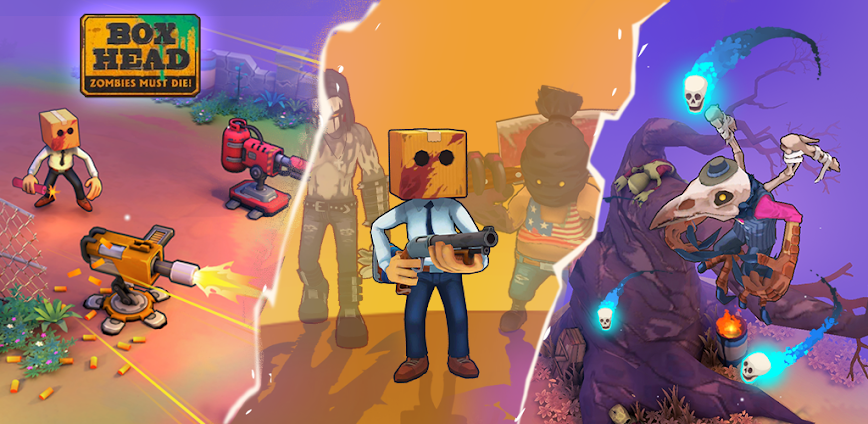
Box Head: Roguelike is a 3D action roguelike game where players battle endless zombie waves in a post-apocalyptic world using diverse weapons from katanas to laser rifles. The game targets survival action fans who enjoy roguelike mechanics with cell-shaded visuals and varied enemy encounters. New players face randomized dungeon layouts where each run differs, requiring quick adaptation to changing zombie types with unique strengths and weaknesses.
From hands-on testing, control responsiveness becomes a notable issue as the joystick occasionally freezes mid-combat causing avoidable deaths. The Unleash Your Arsenal system offers flamethrowers, katanas, and laser rifles with unique abilities, while Forge Your Defenses allows upgrading armor and gear for customized playstyles. However, some players report the auto-lock targeting rolls characters toward enemies instead of desired directions, and the upgrade selection screen appears during combat causing accidental skips.
Users exploring modified versions typically want to overcome the resource grind and test various weapon combinations without extensive farming sessions. This allows evaluating whether late-game gear and dungeon depths genuinely match their preferred roguelike survival style. Consider using a secondary account for testing purposes, keeping your main progression and any unlocked equipment separate from experimental installations.
Should You Use Box Head: Roguelike?
This Game is Ideal For:
- Roguelike enthusiasts seeking randomized dungeon runs where no two playthroughs deliver identical experiences
- Short-session gamers wanting complete runs during 15-20 minute commutes or work breaks
- Zombie survival fans appreciating cell-shaded visuals with varied enemy types requiring different tactics
- Weapon collectors who enjoy unlocking diverse arsenals from melee katanas to ranged laser rifles
Consider Alternatives If:
- Control precision matters most – joystick responsiveness issues cause frustrating deaths during intense combat
- You dislike auto-targeting – lock-on system sometimes rolls toward enemies instead of your intended direction
- Extended play sessions interest you – gameplay can feel repetitive after several days according to reviews
- Free-to-play fairness concerns you – progression noticeably slows without optional purchases for stronger gear
Key Features of Box Head: Roguelike
Box Head combines roguelike dungeon crawling with zombie survival action in a cell-shaded post-apocalyptic world. Here are the standout capabilities:
- Unleash Your Arsenal – Choose from flamethrowers, katanas, laser rifles, and cannons each delivering unique attack patterns
- Forge Your Defenses – Upgrade armor and gear to withstand zombie onslaughts while customizing equipment for your playstyle
- Roguelike Challenge – Experience randomized dungeon layouts ensuring no two playthroughs present identical enemy arrangements
- Varied Zombie Types – Face different undead enemies with unique strengths and weaknesses requiring strategic adaptation
- Dungeon Exploration – Navigate procedurally generated levels filled with hidden dangers and room-clearing combat encounters
- Timed Dodge Mechanics – Master precise dodge timing to evade enemy attacks and learn zombie behavior patterns
- Gear Progression System – Collect scrap resources to permanently upgrade equipment between roguelike runs
Download & Installation Guide
Important Security Notes:
- Modified APKs may conflict with official versions
- Consider using a test device or secondary account
- Back up important data before installation
Installation Steps:
- Enable “Install from Unknown Sources” in Settings > Security
- Download the APK file to your device
- Locate the file in your Downloads folder and tap to install
- Grant storage and network permissions when prompted for game data and optional ad rewards
- Launch and complete the initial dungeon tutorial to verify combat controls and weapon switching function properly
App-Specific Considerations:
- Online connectivity is required for progression synchronization and certain reward features
- Test control responsiveness early as joystick issues vary significantly across different device models
- Consider purchasing infinite inventory with early tokens as storage management becomes problematic later

- Unlimited Uranium
- Unlimited Material
- Unlimited Chips
 Show/Hide Mod info: