ANGELICA ASTER 1.52.2 MOD Menu APK | Damage Multipiler, God Mode

- Updated
- Version 1.52.2
- Size 55 MB
- Requirements Android 9.0
- Developer DMMGAMES
- Genre Role Playing
- Google Play





About ANGELICA ASTER
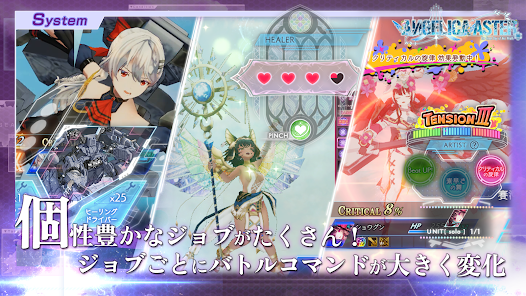
ANGELICA ASTER is a 3D turn-based RPG featuring aerial combat where winged angels battle massive divine beasts across expansive skies. The game appeals to gacha collectors who enjoy character progression systems and story-driven battles with cinematic presentation. However, the game is Japanese-only without English localization, and users report the command selection interface during battles feels confusing with multiple gray-colored elements making targeting difficult.
From hands-on combat sessions, the complexity of job-based commands becomes apparent when positioning angels against gigantic enemies. Features like the Oparts equipment system, Hato Café facility upgrades, and extensive mini-games including fishing, medal dropping, and music rhythm stages provide variety. Many users report the skip function requires both stamina and special items simultaneously, creating frustrating grinding loops despite being marketed as a convenience feature.
Users exploring modified versions typically want to evaluate the complete angel roster and progression systems without gacha limitations restricting their team-building options. This allows testing whether the aerial combat mechanics genuinely match their strategic RPG preferences before committing significant time. Consider using a secondary account for testing to protect any progress on your primary profile.
Should You Use ANGELICA ASTER?
This Game is Ideal For:
- Gacha collectors seeking high-quality 3D anime aesthetics with detailed angel character models and battle animations
- Mini-game enthusiasts wanting variety beyond main combat through fishing, puzzles, rhythm games, and medal challenges
- Base-building fans who enjoy upgrading café facilities and managing resources for incremental progression bonuses
- Story-focused players drawn to mythic narratives about angels versus ancient divine beast warships threatening humanity
Consider Alternatives If:
- English language support is essential – the game currently offers Japanese-only text and voice options
- Clean battle interfaces matter – users report confusing gray command selections and unclear enemy targeting systems
- Efficient grinding is preferred – skip functions require both stamina and special items creating redundant resource sinks
- Voice casting quality concerns you – some users note significant mismatches between character appearances and voice acting
Key Features of ANGELICA ASTER
ANGELICA ASTER combines aerial turn-based combat with extensive character progression and casual diversions. Here are the standout capabilities:
- Aerial 3D Turn-Based Combat – Command angel squads flying through expansive skies to strategically engage massive divine beast enemies
- Job-Based Command System – Each angel’s class determines available battle commands, requiring diverse roster building for tactical flexibility
- Oparts Equipment System – Collect and enhance mysterious ancient gear pieces to fine-tune character builds and push specific roles
- Hato Café Facility Management – Upgrade base facilities to unlock progression boosts, resources, and convenience features for long-term play
- Awakening and Affinity Systems – Develop angel potential through multiple growth paths including skill enhancement, awakening, and relationship building
- Extensive Mini-Game Collection – Take breaks from combat with fishing, medal dropping, rhythm stages, block breaking, and falling puzzles
- Divine Beast Story Campaign – Experience the mythic conflict between angels and ancient war relics threatening humanity’s survival
Download & Installation Guide
Important Security Notes:
- Modified APKs may conflict with official versions
- Consider using a test device or secondary account
- Back up important data before installation
Installation Steps:
- Enable “Install from Unknown Sources” in Settings > Security
- Download the APK file to your device
- Locate the file in your Downloads folder and tap to install
- Grant network and storage permissions when prompted for server synchronization and save data functionality
- Launch and complete the initial tutorial to unlock gacha summoning and main combat systems before testing team builds
App-Specific Considerations:
- The game requires approximately 2.4GB storage space – ensure sufficient free space before installation and initial data download
- Online connection is mandatory for gameplay since this is a server-based gacha title without offline functionality
- Avoid binding to DMM accounts until confirming modified version stability as account verification may detect modifications

- Damage Multipiler
- God Mode
 Show/Hide Mod info: