1.1.1.1 + WARP: Safer Internet 6.83.0 MOD APK | Premium/WARP+ Unlimited

- Updated
- Version 6.83.0
- Size 61.48 MB
- Requirements Android 5.0
- Developer Cloudflare Inc
- Genre Tools
- Google Play


About 1.1.1.1 + WARP: Safer Internet
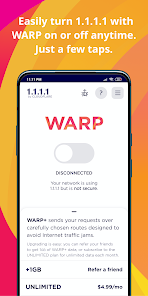
1.1.1.1 + WARP is Cloudflare’s privacy-focused app combining fast DNS resolution with encrypted VPN-like protection using WireGuard-based BoringTun protocol. The app targets privacy-conscious users and travelers connecting through public WiFi networks who need traffic encryption without traditional VPN complexity. New users face confusion distinguishing between 1.1.1.1 DNS-only mode and WARP encrypted tunnel mode, while some experience intermittent connectivity issues requiring manual reconnection.
From hands-on testing, the 1.1.1.1 for Families feature adds malware and phishing protection beyond standard DNS encryption, blocking known threat domains automatically. The WARP+ subscription tier utilizes Argo Smart Routing technology for optimized server paths and faster connections. However, users report WARP occasionally disrupts connections to specific websites that block Cloudflare IP ranges, and some experience disconnection issues requiring app restarts to restore internet functionality.
Users exploring modified versions typically want to evaluate WARP+ premium speed benefits and extended features without ongoing subscription costs. The free tier provides strong encryption and privacy, but WARP+ performance improvements appeal to those seeking faster routed connections. Evaluate compatibility with your frequently visited websites before committing, as some services may experience access issues when connecting through Cloudflare’s network infrastructure.
Should You Use 1.1.1.1 + WARP: Safer Internet?
This App is Ideal For:
- Public WiFi users protecting sensitive data at coffee shops, airports, and hotels from network snooping
- Parents wanting malware and adult content filtering through 1.1.1.1 for Families DNS protection
- Privacy-focused individuals encrypting DNS queries to prevent ISPs from monitoring browsing activity
- Mobile workers needing quick one-touch privacy protection without complex VPN configuration processes
Consider Alternatives If:
- Users needing geo-unblocking capabilities – WARP maintains your home country location and cannot bypass region locks
- Gamers requiring low latency – WARP increases ping times which negatively affects real-time competitive gaming
- Users accessing websites blocking Cloudflare IPs – some sites deny access when connecting through WARP tunnel
- Reliability-dependent users – intermittent disconnection issues may disrupt critical browsing sessions unexpectedly
Key Features of 1.1.1.1 + WARP: Safer Internet
1.1.1.1 + WARP combines DNS-level privacy with encrypted tunneling across Cloudflare’s global network infrastructure. Here are the standout capabilities:
- 1.1.1.1 DNS Mode – Resolve domain queries through Cloudflare’s encrypted servers without full traffic tunneling for minimal speed impact
- WARP Encrypted Tunnel – Route all device traffic through WireGuard-based BoringTun protocol to nearest Cloudflare server
- 1.1.1.1 for Families – Enable automatic blocking of malware, phishing, crypto mining, and optionally adult content domains
- WARP+ with Argo – Utilize smart routing technology that optimizes traffic paths through Cloudflare’s private network backbone
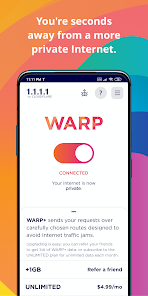
- One-Touch Activation – Toggle protection instantly without complex settings or configuration procedures required
- Zero-Log Privacy Policy – Cloudflare commits to never selling user data or logging browsing history for advertising purposes
- IPv4 and IPv6 Support – Handle both modern and legacy IP protocols seamlessly through encrypted connections
Download & Installation Guide
Important Security Notes:
- Modified APKs may conflict with official versions from Cloudflare
- Consider using a test device or secondary network profile for evaluation
- VPN-like apps route all traffic – verify trustworthiness before installation
Installation Steps:
- Enable “Install from Unknown Sources” in Settings > Security
- Download the APK file to your device
- Locate the file in your Downloads folder and tap to install
- Grant VPN configuration permissions when prompted as WARP requires network tunnel access
- Launch and tap the toggle switch to activate protection before browsing to confirm successful connection
App-Specific Considerations:
- Enable battery optimization exceptions to prevent Android from disconnecting WARP during background operation
- Test frequently visited websites with WARP enabled as some services block Cloudflare IP ranges
- Disable WARP temporarily if experiencing connectivity issues with specific apps or banking services

- Makes Internet More Private & Faster
- Blocks Any Snooping Attempts
- Protects Device From Security Threats
- One-Tap Safe Internet
- Unlimited Usage